The Amazon integration allows you to connect your Amazon Seller account to Finzite and pull your order and revenue data into one unified dashboard.
What data does Finzite pull from Amazon?
- Orders
- Revenue
- Sales performance data
How do I connect my Amazon account?
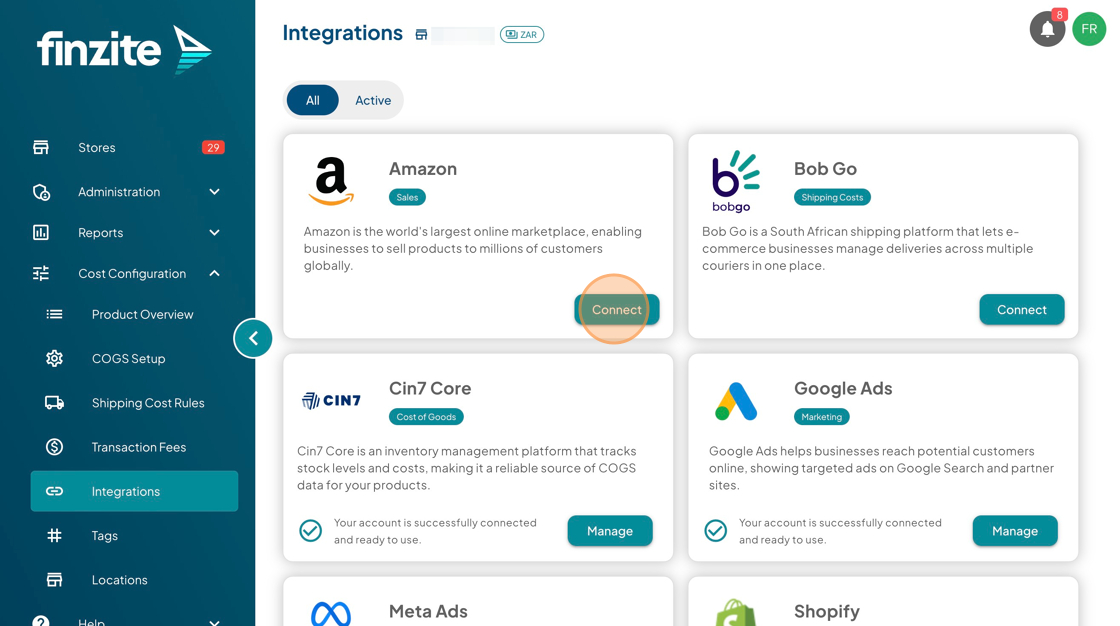
- Go to Cost Configuration → Integrations
- Locate Amazon
- Click Connect
- Follow the authentication steps
Why is my Amazon data not showing?
- Ensure the integration is connected
- Refresh the connection
- Check your selected date range
- Confirm Amazon is toggled on in your filters
What should I do if the issue is still not resolved?
Remove the integration and connect it again.
If the issue continues after completing the steps above, please contact our support team:
Visit help.finzite.io
Or submit a ticket via our Customer Support Portal
Please include:
- Your store name
- The affected integration
- A description of the issue
- Screenshots (if possible)
Was this article helpful?
That’s Great!
Thank you for your feedback
Sorry! We couldn't be helpful
Thank you for your feedback
Feedback sent
We appreciate your effort and will try to fix the article
