What is ad channel filtering?
Ad spend filtering allows you to control which advertising channels (e.g. Meta, Google, TikTok) are included in your reports and dashboards.
How do I use ad spend filtering?
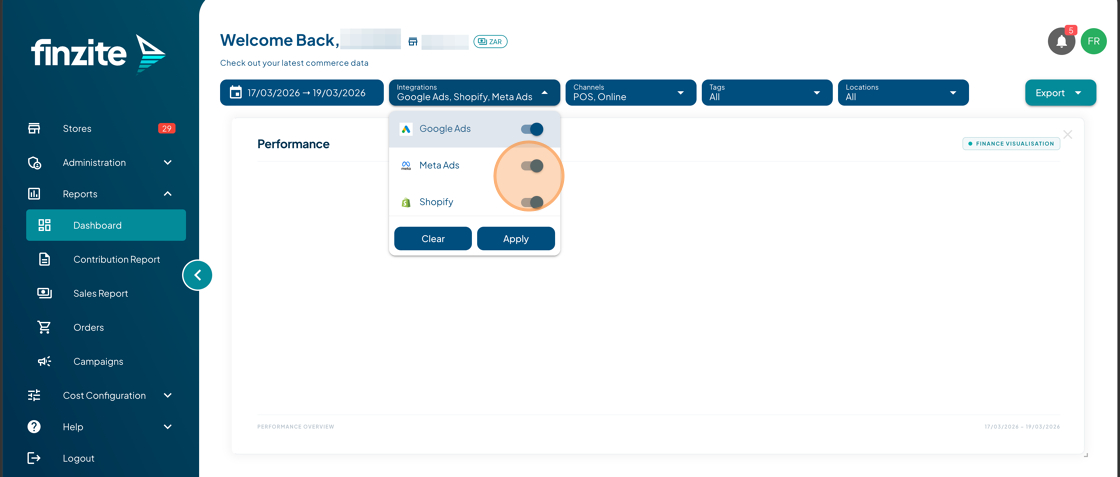
Ad spend filtering is applied directly from the dashboard:
- Go to your Dashboard
- Click the Ad Channels / Integrations filter
- Toggle the ad platforms you want to include (e.g. Meta, Google, TikTok)
- Click Apply
Your reports will now reflect only the selected advertising channels.
Why would I use this?
This allows you to:
- Analyse performance per ad platform
- Compare results between Meta, Google, and TikTok
- Understand which channels are driving profitability
- Remove noise from other channels when analysing data
Why is my ad spend not showing?
- The integration may not be connected
- The ad channel may be toggled off in the filter
- The selected date range may not contain ad data
- Data may still be syncing (allow a few minutes after connecting)
Why is my data not changing when I select channels?
- Ensure you clicked Apply after selecting channels
- Check your date range
- Confirm that ad spend exists for the selected platform
What should I do if the issue is still not resolved?
If the issue continues after completing the steps above, please contact our support team:
Visit help.finzite.io
Or submit a ticket via our Customer Support Portal
Please include:
- Your store name
- The affected integration
- A description of the issue
- Screenshots (if possible)
Our team will assist you as quickly as possible.
Was this article helpful?
That’s Great!
Thank you for your feedback
Sorry! We couldn't be helpful
Thank you for your feedback
Feedback sent
We appreciate your effort and will try to fix the article